 Fynq
Fynq Struggling With High Bounce Rates? Your Search Data Can Help
Suppose someone visits your store, viewing only one page… and then leaves without clicking anything. That’s what’s known as a bounce, and it often means the shopper didn’t find what they were expecting. Relevantly, a typical e-commerce bounce rate varies from 20% – 45%.
For merchants, a high bounce rate is not something expected. You’ve invested time and money getting people to your store, but they’re walking away without buying, browsing, or even engaging. So, what’s going wrong?
That’s where Fynq’s analytics come in. You can use real data to understand why people are bouncing and take calculated steps to fix it.
Table of Contents
- Where to Start Looking in Your Analytics
- How to reduce bounce using these insights
- More Time on Site, More Chances to Convert
Where To Start Looking in Your Analytics
There are a few key places in your Fynq Analytics dashboard that offer clues:
1. 0 Results Tab
If many users are searching and not finding the right thing, they’re more likely to leave right away. This could be due to:
- Search terms you haven’t accounted for
- Alternate names (like “joggers” vs “track pants”)
Look at the most common “no result” terms. Are they things your store should be showing results for?
2. All Searches & Products Viewed Tabs
Let’s say a search term appears often in All Search, but very few products get clicked under Products Viewed. That’s another red flag. It suggests the results aren’t relevant or attractive enough to their searches.
Maybe your top results aren’t what customers expect. Maybe they’re too generic, or your most compelling products are buried too far down.
3. Product Added to Cart Tab
Even when users don’t bounce right away, if they never go as far as adding something to the cart, that’s a sign the experience could have been more engaging. You have to work on that.
How to reduce bounce using these insights
Once you’ve spotted where customers are losing interest, here’s how to keep them browsing longer:
Improve your zero-result search experience
- Add missing synonyms for common terms
- Check if your products have the right titles, tags, and descriptions
Read this blog to know more: Fixing ‘No Result Found’ Searches in Your Store
Tune the relevance of search results
If your most searched terms aren’t producing meaningful clicks:
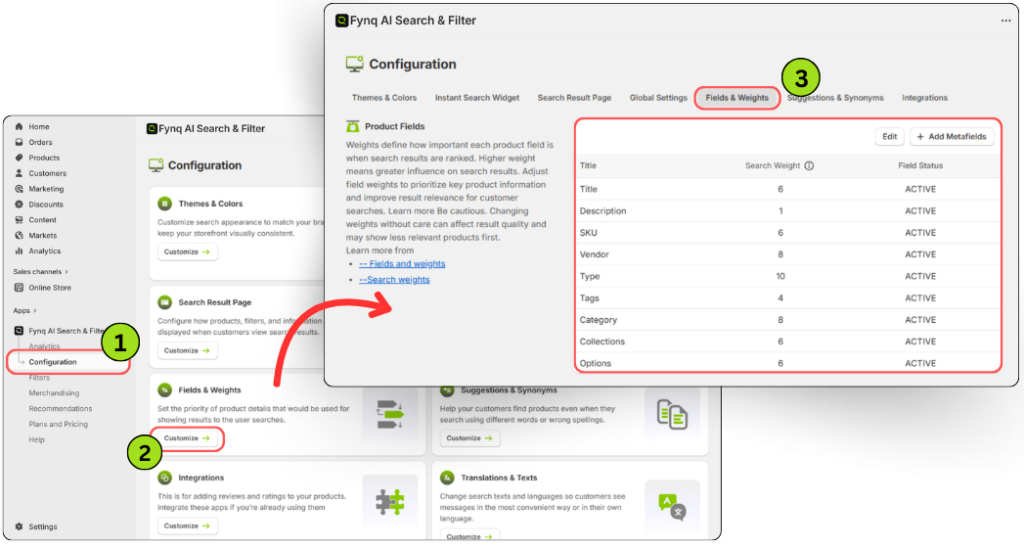
- Revisit your Fields & Weights (Navigate through: Configurations > Fields & Weights).
- Make sure you include fields like tags, variants, or descriptions to bring more targeted results.
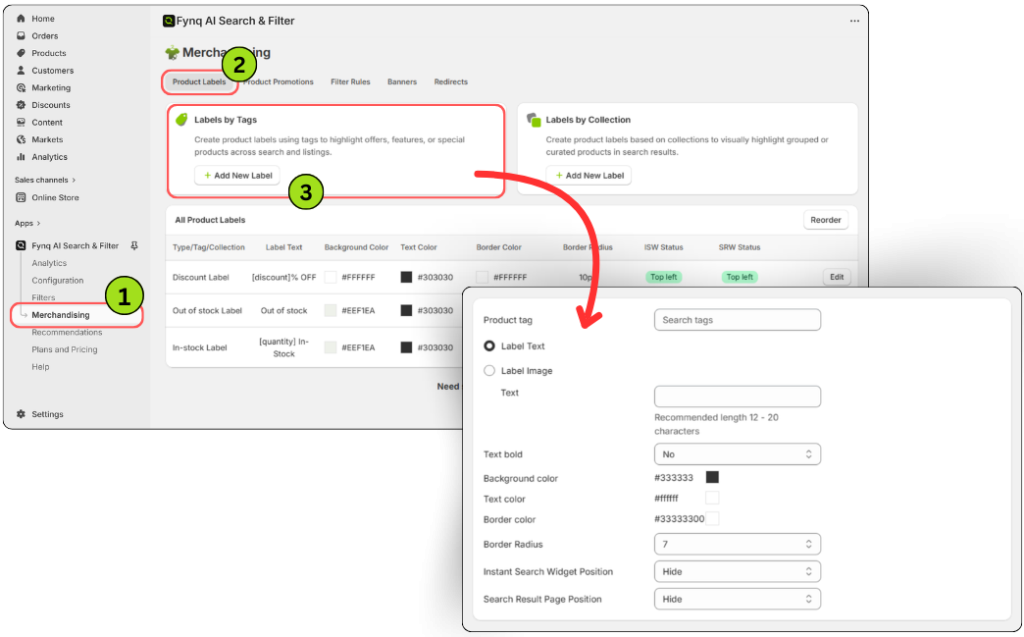
- Add attractive labels (Merchandising > Product Labels) to high-converting products so they grab shoppers’ attention.
Revisit The Layout and Design
Even if the search results are technically correct, they might still look uninviting. Use Fynq’s personalization tools to:
- Adjust filter positions or display layouts (Here’s guide> How to set filter layout positions for better UX)
- Make search results feel easier to browse
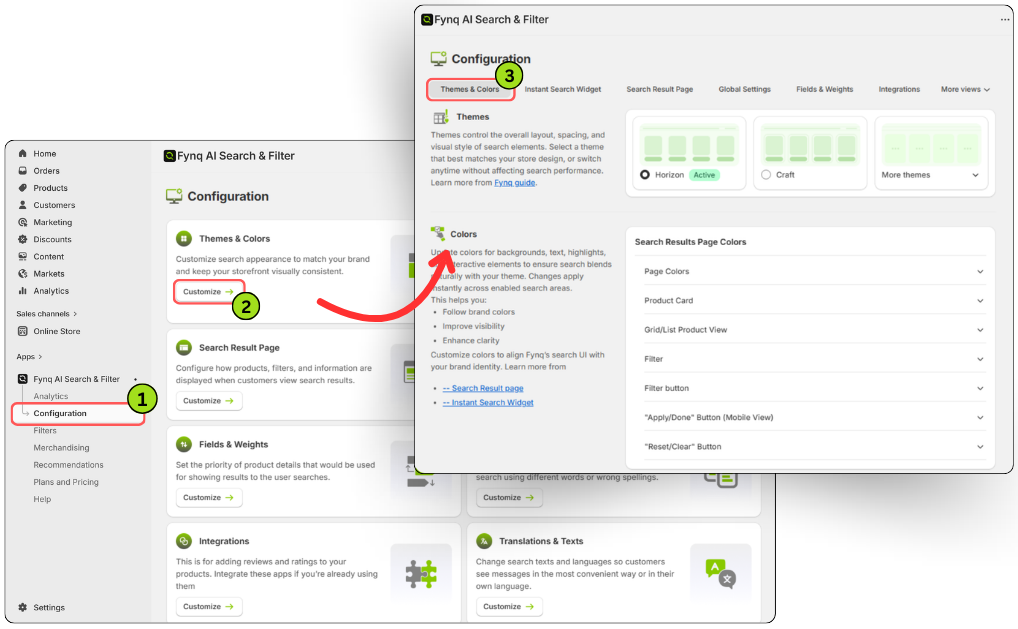
- Choose colors according to your business niche (Configuration > Themes & Colors > Colors). For guide, click here> Styling with Colors & Fonts
Create guided search experiences
If people search for vague or broad terms, help guide them. Offer the following:
- Search suggestions
- Smart filters
- Contextual search banners or links
Read more in this blog: Enabling search suggestions in the widget
More Time on Site, More Chances to Convert
If you want to reduce bounce rate, it isn’t only about chasing every visitor. You have to make sure that the ones who arrive on your ecommerce site have a clear, helpful path to what they’re looking for. With Fynq’s search analytics, that path becomes a lot easier to see.
When your store’s search actually understands your customers, they stay longer, explore more and ultimately build trust in your store. That naturally enhances the chance and are more likely to buy.
