 Fynq
Fynq How to Contact the Fynq Support Team for Questions or Theme-Specific Help
Sometimes, even with the best tools in place, you might need a little extra support. Whether you’re running into a technical issue, need help integrating Fynq into your custom theme, or just want clarity on how a feature works, our team is here to assist you.
In this guide, we’ll show you when it’s the right time to reach out, and how you can do it easily right from inside the app or through our external support page.
When Should You Reach Out to Fynq Support?
If you’re unsure whether to contact support, here are some common reasons when it’s perfectly appropriate, and encouraged:
- Something’s not showing properly: If search results, product filters, or product recommendations aren’t appearing as expected.
- Theme conflicts: If your store uses a custom or heavily modified theme and Fynq’s elements aren’t aligning or displaying correctly.
- Need help with app setup: If you feel stuck or unsure while setting up filters, search behaviors, product labels, or anything else.
- Custom requests: If you need Fynq to fit into a very specific layout or want help with theme-specific CSS tweaks or tag handling.
- Performance questions: If search speed feels laggy, filters seem broken, or you’re unsure about product sync behavior.
- Plan or billing concerns: If you’re not sure about your plan limits or need guidance on upgrading or downgrading.
If your question or issue isn’t listed here, no problem. You’re always welcome to reach out; our team responds quickly and is happy to help.
Contact Fynq Support from Within the App
The easiest way to contact us is directly through your Fynq admin panel.
Go to: Fynq Image & Search AI app → Help tab
Once there, you’ll see a simple form. Fill in the following:
- Your name
- Your email address
- A short message describing your issue, request, or question
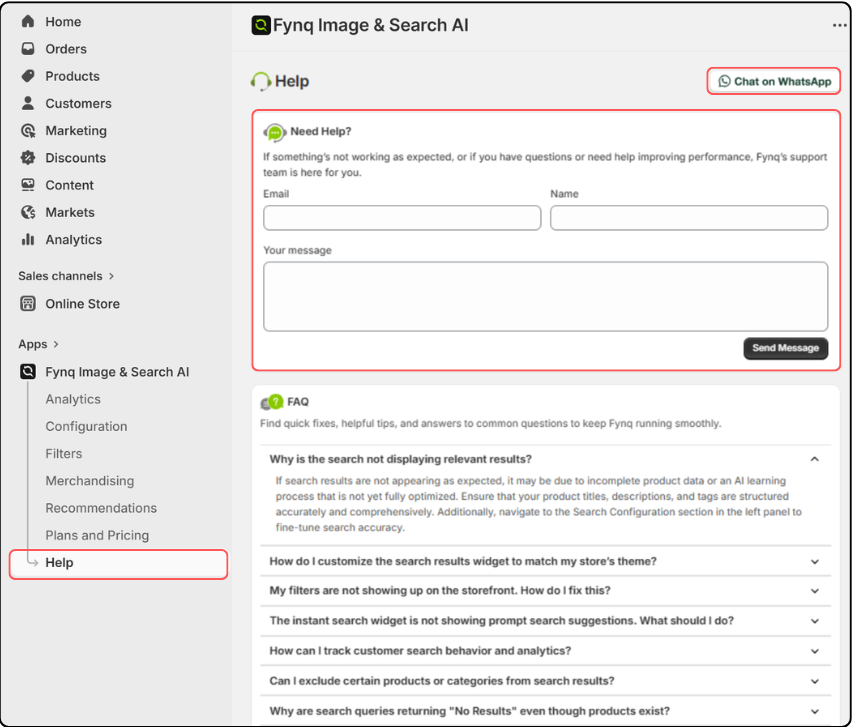
When you’re ready, just click ‘Send Message’ and your message will be delivered to our support team. We usually respond quickly and aim to resolve most issues within a short time.
Prefer a Chat?
You’ll also see a “Chat on WhatsApp” button at the top-right corner of the Help page.
Click it to start a real-time conversation with someone from the team. This is great if you want to talk through an issue or ask something urgent.
Want to Reach Us Outside the App?
If you’re not in your Shopify dashboard right now, or prefer contacting us directly, we do have a window for that.
Just head over to our dedicated support page: Fynq Support Page (Click here)
From there, you can submit a query, ask a question, or request a callback about (whichever method works best for you).
Final Thoughts
No matter the issue, technical or general, Fynq’s support team is always within reach. We understand that as a merchant, your time matters. That’s why we keep our communication clear, fast, and helpful.
If something doesn’t feel right, or if you just need a bit of clarity, don’t hesitate. Visit the Help page in the app or jump over to our Support Page anytime. We’re here to make sure Fynq works smoothly for your store.
