 Fynq
Fynq Why Is Fynq Search Running Slow? Here’s What to Check and Fix
You open your storefront, start typing in the search bar, and something feels…off. The results take longer than usual to appear. Filters seem to lag. The product grid loads slowly. And if you noticed it, your customers probably will too.
The good news? Laggy search behavior in Fynq usually has a clear cause, and most of the time, you can fix it yourself with just a few checks.
Let’s walk through the most common reasons and what you can do to get your store running smoothly again.
1. Are You Overloading the Filter List?
Fynq lets you build advanced, flexible filters. But too many filters, especially ones based on tag prefixes or metafields, can slow things down.
What to check:
- Go to Fynq Image & Search AI → Filters → Filter List → Filter Table
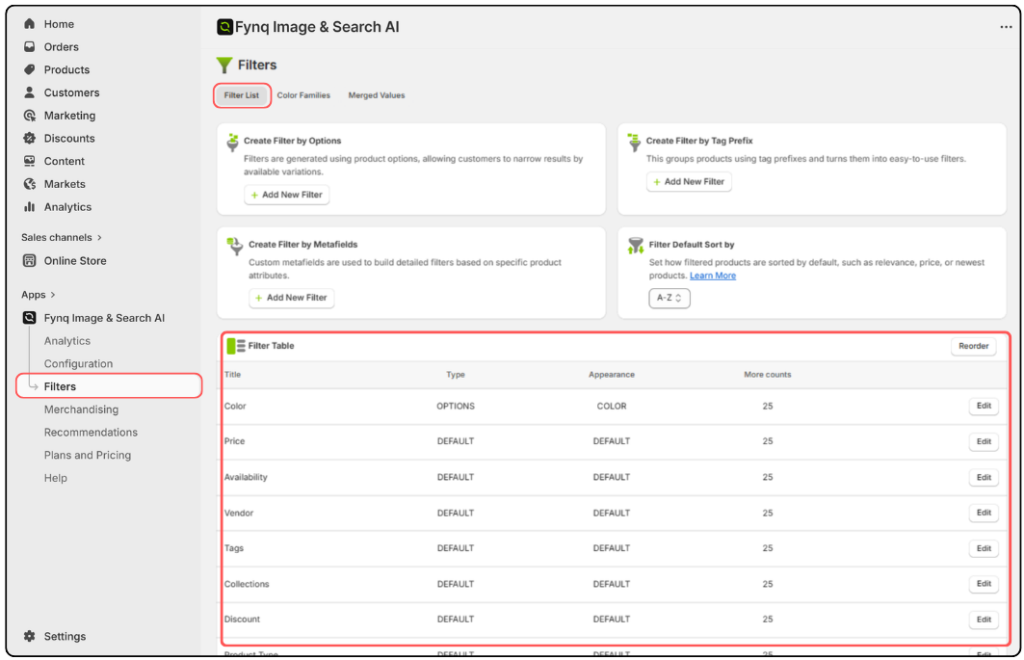
- See how many filters are active and what fields they use
- Filters pulling from large datasets (e.g. collections, vendors, metafields) may load slower
What to do:
- Remove filters that aren’t essential to the shopping experience
- Use “More Count” settings to limit how many filter values load up front
- Try Merged Values or Color Families to simplify complex filters into neater groups
A simplified filter panel doesn’t just boost speed; it makes shopping easier too.
2. Are Search Suggestions Too Crowded?
Default suggestions help guide shoppers, but overloading this list can make your search feel slower, especially on mobile.
What to check:
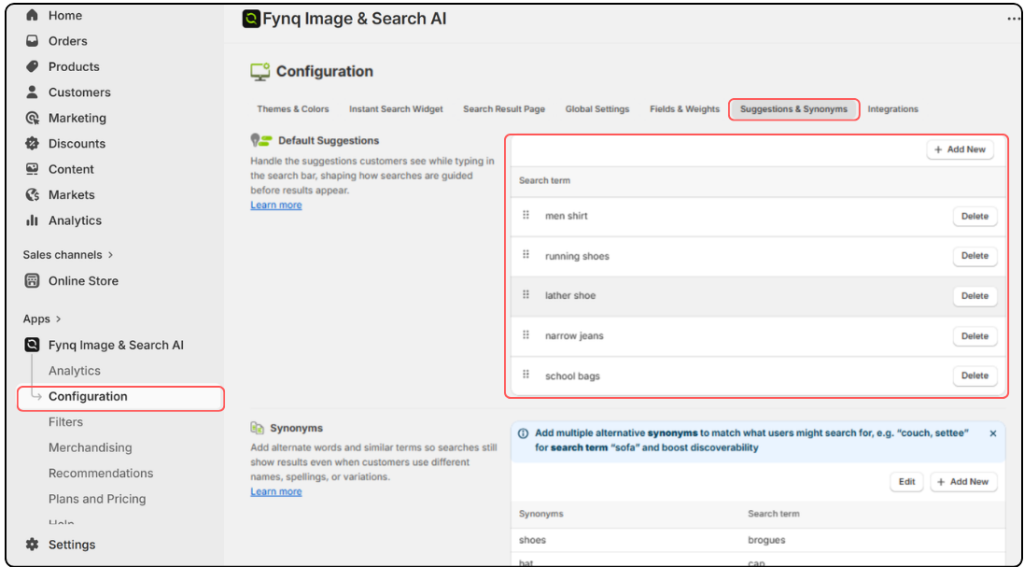
- Go to Fynq > Configuration > Suggestions & Synonyms > Default Suggestions
- See how many suggestions are listed and if they still make sense
What to do:
- Trim outdated or seasonal suggestions
- Keep the list lean. 5 to 8 suggestions is ideal
- Reorder based on what’s trending using the drag handle
Take suggestions as gentle nudges. The cleaner and shorter the list, the faster the search will respond.
3. Are Too Many Fields Assigned High Search Weight?
When search fields like Title, Tags, Description, Vendor, and SKU are all set to high weights, Fynq has more data to process which can add delay.
What to check:
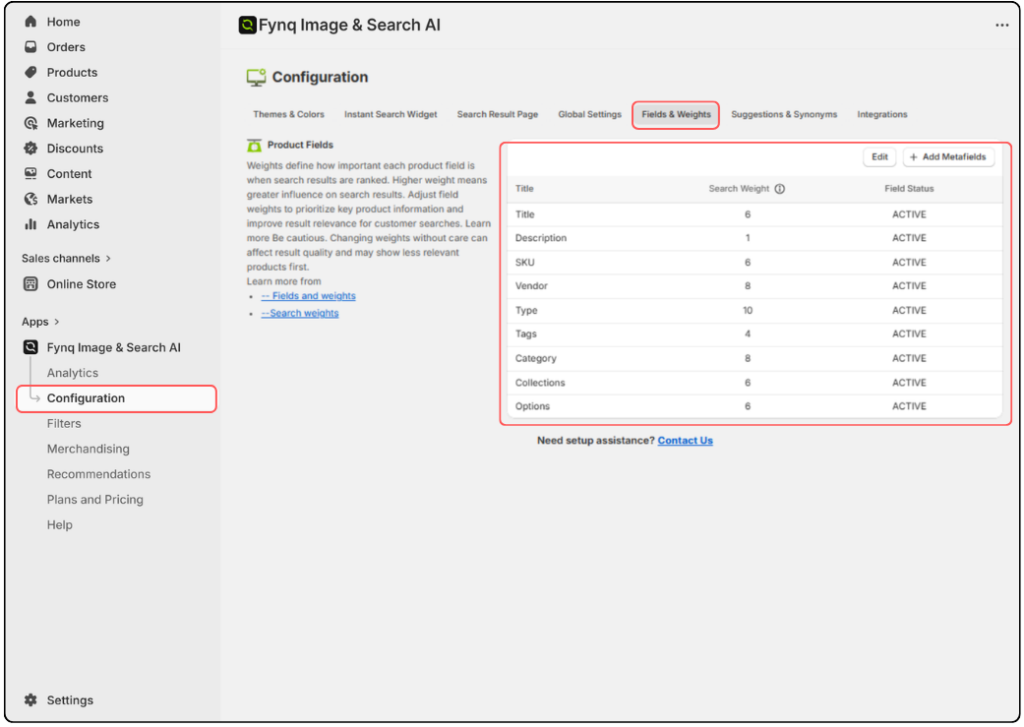
- Go to Fynq > Configuration > Fields & Weights
- Review which fields are marked ACTIVE and what weights they carry (*This step is very important)
What to do:
- Keep Title and 1–2 relevant fields (like Tags or Collections) with higher weights
- Deactivate fields that aren’t adding value (like Vendor or SKU if unused)
- Lower unnecessary weights
A focused search engine is faster. Let Fynq prioritize what truly matters to your customers.
4. Check for Theme or App Conflicts
Sometimes the search backend is fast, but your theme makes it look slow.
Heavy custom themes or third-party apps with pop-ups, overlays, or animations can cause:
- Delayed rendering of results
- Visual lag even when results are ready
- Clashing filter behavior
What to do:
- Test search behavior on a default Shopify theme (like Dawn)
- Temporarily disable third-party apps to isolate the issue
- Contact us to review for known conflicts.
Need help with Theme customization?
Message us from the app’s Help page and we’ll take a look.
5. Are Product Images or Metafields Weighing Things Down?
It’s not always the search engine itself. It could be the product card content slowing things down.
What to check:
- Are your images large or uncompressed?
- Are product cards loading lots of metafields or variants?
What to do:
- Use optimized, compressed images
- Limit how many variants are shown in Instant Search
- Disable non-essential data fields from appearing in the search result display
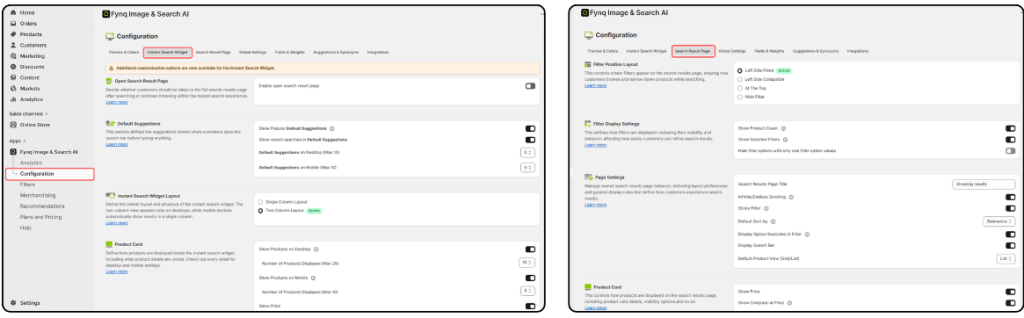
You can adjust these settings from:
Fynq > Configuration > Instant Search Widget
or,
Fynq > Configuration > Search Result Page
6. Did You Recently Add More Products Than Your Plan Allows?
Plans in Fynq are based on product count, not features. If you add more products than your current plan supports, the extra ones won’t sync, and that can cause search or filters to behave unpredictably.
What to do:
- Go to Fynq → Plans and Pricing
- Check if your product count exceeds your plan
- If so, upgrade to the suggested plan for a smoother experience
Unsynced products won’t appear and can slow down the user experience. Keep your plan aligned with your catalogue size. Go through this guide (10.1.1. Understanding Fynq plans: Features vs. pricing tiers) to know more.
7. Still Feeling Lag? Let Us Take a Look
If you’ve checked all the above and things still feel slow, our support team can help.
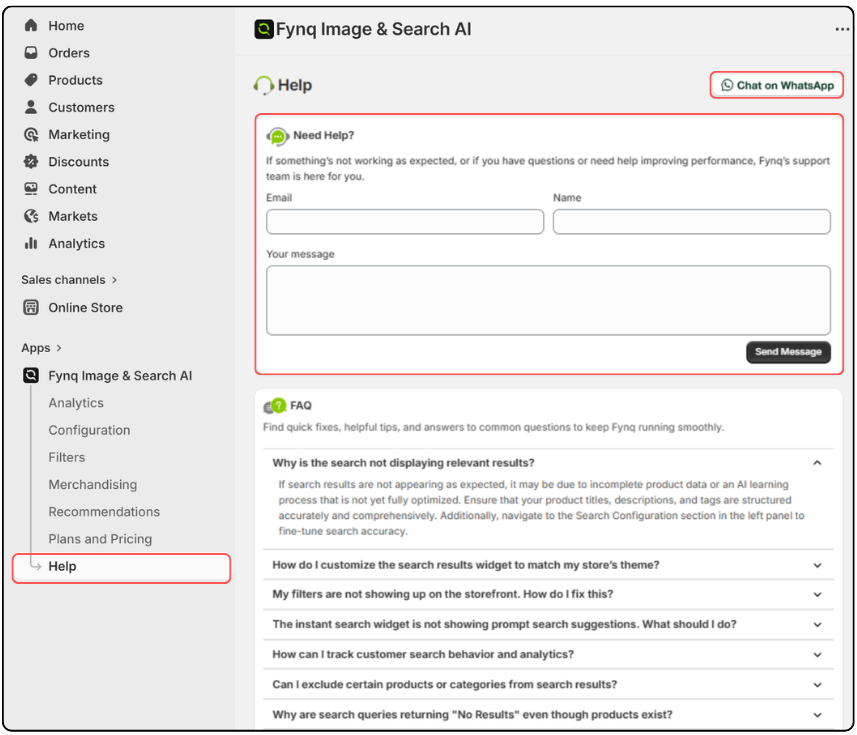
- Go to Fynq Image & Search AI → Help
- Enter your email, name, and a message explaining the issue
- Or click Chat on WhatsApp in the top-right corner for quick support
We’ll investigate things like:
- Sync delays
- Server-side behavior
- Theme or app-level conflicts
Final Thoughts
Search lag is frustrating, but it doesn’t have to last. Most delays come from filters that are too wide, heavy product data, too many suggestions, or mismatched plan limits. Trim what you don’t need. Focus your search fields. Keep images light. And when in doubt, just ask, we’re always here to help you fine-tune your store for faster, smoother performance.
Fynq is built to move fast. A few small adjustments can bring back the speed your customers expect every time they search.
