 Fynq
Fynq How to Upgrade or Cancel Your Fynq Plan
Choosing the right plan in Fynq isn’t just about price; it’s about matching your product volume with the support your store needs to grow. Whether you’re just starting out or scaling up fast, Fynq offers flexible options to support your catalog size, with no difference in features across plans.
This guide will help you explore where to manage your plan, how to upgrade when your store grows, and how to cancel if needed, all in clear, simple terms.
Where to View and Manage Your Current Plan
To check what plan you’re currently on, or to explore other available plans:
Go to: Fynq Image & Search AI → Plans and Pricing
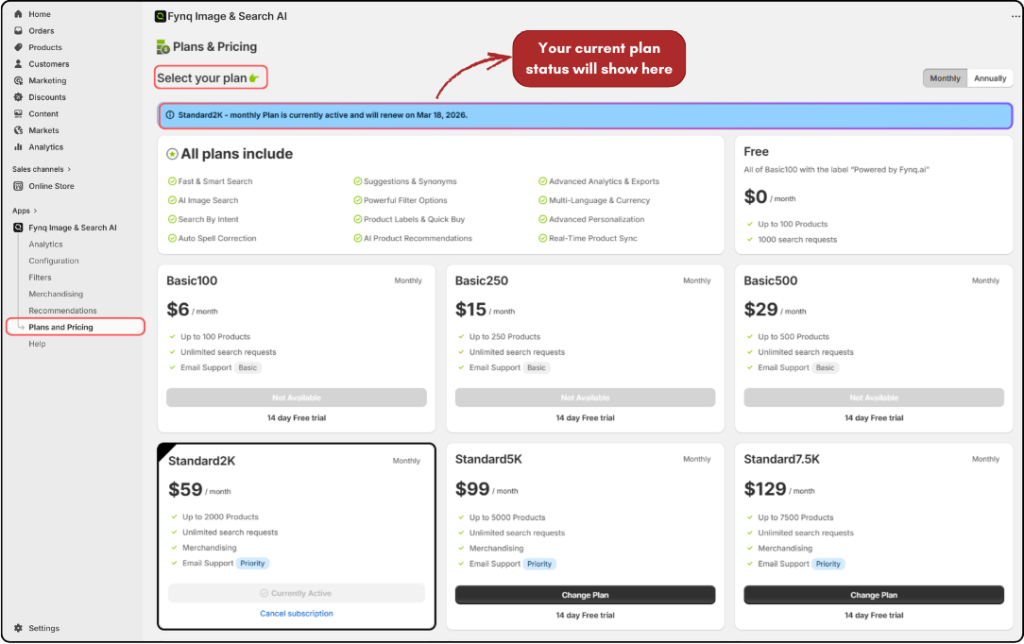
At the very top of this page (and also on your Fynq dashboard), you’ll see your active plan status (with the next renewal date), whether you’re on a free trial, a paid plan, or the fallback FREE plan.
This section also lists all available plans side by side, so you can compare pricing, product limits, and support levels at a glance.
When & Why You Might Need to Upgrade
Upgrading your Fynq plan becomes important when your product count grows beyond your current plan’s limit.
For example:
- If you’re on Basic250 and upload more than 50 products to your Shopify store, only the first 250 will stay synced.
- The rest (allocated by Shopify) will not appear in search or filters powered by Fynq.
In such cases, Fynq automatically detects the mismatch and will suggest the next best plan that suits your new product range. You’ll see this suggested plan on your Plans and Pricing page, along with a prompt to upgrade.
Upgrading ensures all your products remain searchable and visible across your storefront, without interruption.
What Happens When You Change Plans Midway?
If you’re already subscribed to a Fynq plan and decide to switch to a different one before your current billing cycle ends, here’s how it works:
You’ll receive a refund for the unused days from your existing plan, calculated and issued by Shopify. But please note, your new plan starts immediately with its full pricing.
There’s NO adjustment or overlap between the two plans. Shopify treats them as separate purchases: one refund, one new charge. So, you’re not paying extra, but you’re also not getting a discount on the new plan based on the old one.
This ensures a clean, fair transition without interruptions to your service.
How to Cancel Your Fynq Subscription
You can cancel your plan at any time, even in the middle of a billing cycle. When you do, Shopify will automatically calculate your refund based on the unused portion of your current plan.
Here’s what to know:
- Canceling simply means uninstalling the Fynq app from your Shopify store.
- Once removed, your subscription ends, and your billing is adjusted through Shopify’s billing system, not by Fynq.
NOTE: Fynq does not process cancellations or refunds directly. All charges and refunds are handled entirely by Shopify, according to their Refund policy.
What Happens After Cancellation?
If you cancel before your trial ends, you won’t be charged anything.
If you cancel after switching to a paid plan, the refund (if eligible) is automatically processed through Shopify. However, once you cancel:
- Product sync stops
- Smart search and filtering features are disabled
- Your store reverts to its default Shopify search behavior
NOTE: If you’re facing any issue that’s prompting you to consider cancellation, we strongly recommend reaching out to our team first. Many common problems can be solved quickly.
You can contact us directly from the Help page inside the Fynq app or visit our website’s Support page (Click here) for immediate assistance. We’re here to help.
Final Thoughts
Managing your Fynq plan is simple and built around your store’s growth. You can start small, scale up when needed, or opt out when things change. The most important thing is this: your search experience stays powerful and consistent across every tier.
To get the best out of Fynq, keep an eye on your product count and your plan’s capacity. And remember, your current plan is always visible at the top of your Fynq dashboard and the pricing page, so you’re never in doubt.
