 Fynq
Fynq How Changing Search Field Weights Impact Search Behavior (Examples by Industry)
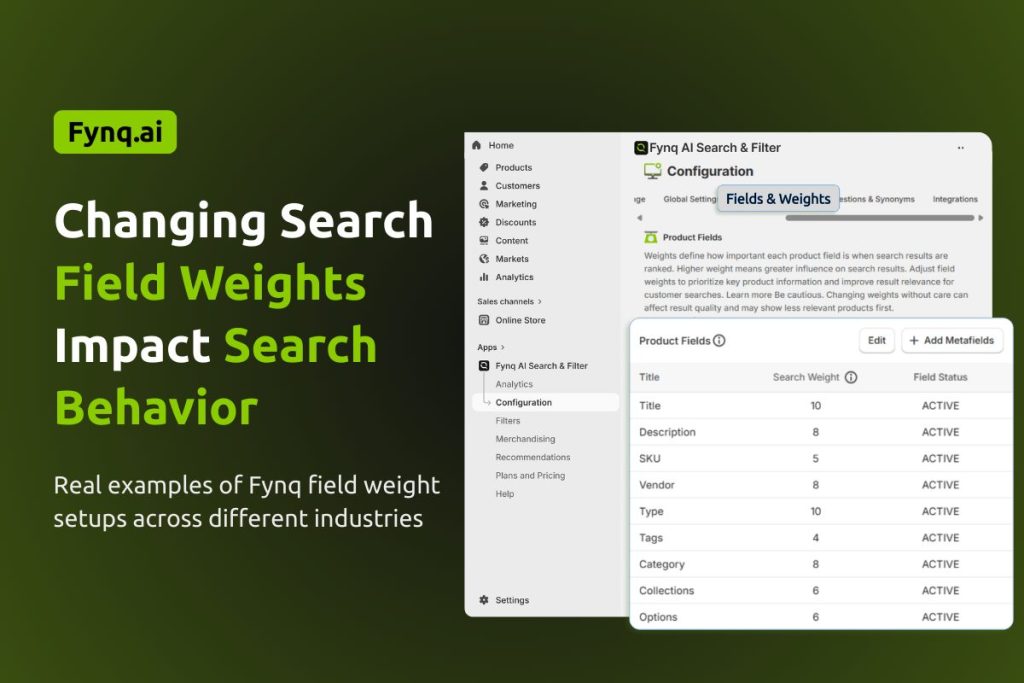
If you’ve just finished assigning weights to your product fields in Fynq, you might wonder what difference it actually makes.
Search weights aren’t just technical numbers. They directly shape which products appear in your store’s search results and why they appear in that order. Depending on what you sell, you may want to highlight the product title, tag, vendor, or even a metafield more heavily.
Here’s a look at how different industries might benefit by adjusting field weights, so you can make smarter choices based on how your store works.
Table of Contents:
- Fashion and Apparel Stores
- Health and Wellness Stores
- Home Decor and Furniture
- Beauty and Personal Care
- Bookstores or Digital Content Shops
Fashion and Apparel Stores
Common searchable fields used: Title, Tags, Options (e.g., size, color), Vendor
Recommended Fynq setup:
- Title = 10
- Tags = 6
- Options = 6
- Vendor = 6
Scenario: A shopper types “red cotton dress”.
If your product title contains “red cotton dress,” the product will likely appear first. But if your titles are creative (like “Summer Breeze” or “Classic Flow”), the tag “cotton” or the option “red” may need a higher weight to ensure it shows up.
Optimization tip: If you rely heavily on tags or options to describe the product material, raise their weights to 8 or 9 so they’re more influential in matching search intent.
Health and Wellness Stores
Common searchable fields used: Title, Type, Description, Tags
Recommended Fynq setup:
- Title = 10
- Description = 4
- Type = 6
- Tags = 6
Scenario: A customer searches for “plant-based protein powder”.
If your product title is simply “Daily Boost,” it might not get picked up unless “plant-based protein” appears in the description or tags. With a description weight low at 4, that product might be buried.
Optimization tip: Boost Description to 6 or 7 if your product titles are short or branded. It helps Fynq prioritize detailed keyword-rich content that supports long-tail searches.
Home Decor and Furniture
Common searchable fields used: Title, Collections, Type, Tags
Recommended Fynq setup:
- Title = 10
- Type = 6
- Collections = 6
- Tags = 6
Scenario: A shopper types “mid-century oak table”.
Your product might be in a collection named “Mid-Century Favorites” and tagged with “oak,” but the title could just say “Luna Dining Table.” With Collections and Tags at 6, that item might rank lower than something with “oak” in the title.
Optimization tip: Raise the Collection field’s weight to 8 or 9 if you use collections to group products by style or material. It helps Fynq see collections as more valuable when matching search queries.
Beauty and Personal Care
Common searchable fields used: Title, Vendor, Tags, Description
Recommended Fynq setup:
- Title = 10
- Vendor = 6
- Tags = 6
- Description = 4
Scenario: A customer searches “vitamin C serum by Bloom Skin”.
If the vendor “Bloom Skin” isn’t emphasized, the result might not rank highly, even if it’s a perfect match. That’s because Vendor has equal weight as Tags or Type.
Optimization tip: Raise Vendor weight to 8 or 9 if shoppers often search by brand. This works well for marketplaces or multi-brand retailers.
Bookstores or Digital Content Shops
Common searchable fields used: Title, Type, Tags, SKU, Description
Recommended Fynq setup:
- Title = 10
- Tags = 6
- SKU = 6
- Description = 4
Scenario: A shopper types “ebook on startup funding”.
If “ebook” is set under Type and “startup funding” is mentioned in the description, that product could still be buried unless the description is weighted higher.
Optimization tip: Increase Type and Description weights if you organize your products by content format or topic-specific language. This helps educational or niche products surface more accurately.
Note: If you’re unsure which field weights are right for your store, feel free to reach out to Fynq’s customer support team; we’re happy to help you tailor your search setup.
Wrap-up
Changing search field weights in Fynq is one of the simplest but most powerful tools you have to control how your store behaves during search. Different industries rely on different fields, and now that you’ve seen how, you can make smart, relevant adjustments.
Here’s what to do next:
- Think about how your shoppers search
- Identify which fields actually carry product meaning
- Adjust weights so those fields influence search more directly
Fynq will take care of the logic; you just need to guide it with the right signals.
