 Fynq
Fynq How To Change the Default Sort Order for Filters in Fynq?
When customers open a filter like “Color” or “Size” in your store, the order of those values can impact what they see and choose. For example, do you want sizes shown alphabetically? Or should the most available colors come first?
In Fynq, you can set a default rule for how filter values are sorted. This saves you time by applying the rule to all new filters you create. Let’s walk through where to find it and how each option works.
Where To Find the Default Sort-by Setting
You can change this from the Filter List settings area.
- Open the Fynq Image & Search AI app
- Go to the Filters section
- Go to the Filter List tab
- You’ll find a brief section labeled Filter Default Sort by
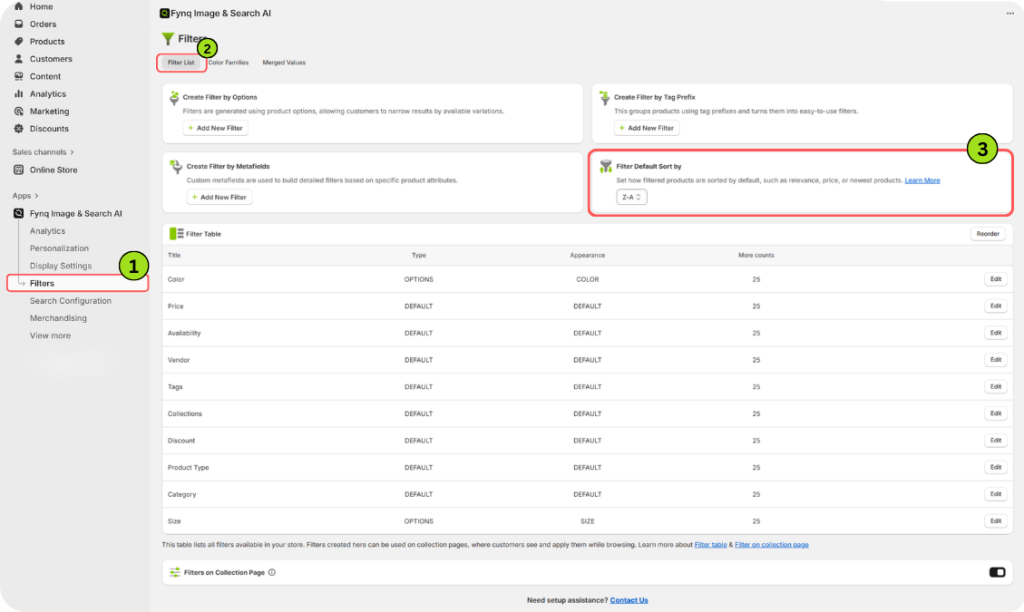
You’ll see a dropdown on the right-hand side with three available sorting options.
Understand Each Sort-by Option
You can choose only one of these as your default. This will be applied to all filters created after this setting is saved.
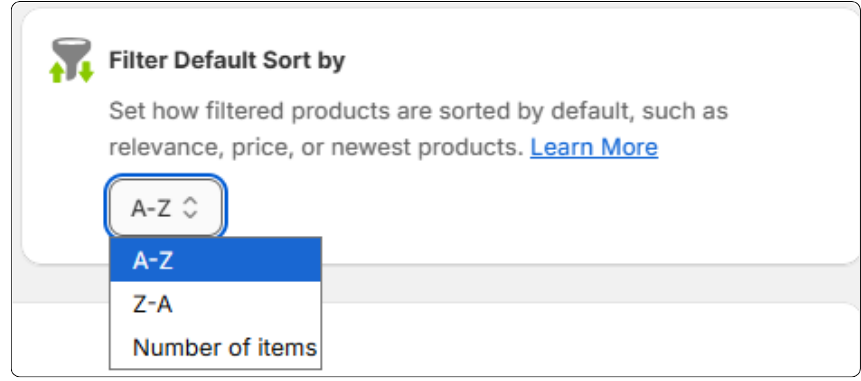
1. A-Z
This arranges your filter values in alphabetical order from A to Z.
Example: If you’re sorting sizes or styles, your filter might display:
Black, Blue, Green, Red, White
When to use it:
Use this if your values follow clear naming patterns or are easier to browse in order.
2. Z-A
This arranges values in reverse alphabetical order.
Example: Using the same colors, it would show:
White, Red, Green, Blue, Black
When to use it:
Useful if your naming follows priority-based terms where last comes first. But use this sparingly unless you have a clear reason.
3. Number of Items
This ranks the filter values based on how many products match each value, the most common first.
Example:
If you sell 54 black shirts, 75 white ones, and 18 red ones, your filter will display:
White, Black, Red
When to use it:
This is great for highlighting the most relevant or popular values at the top.
Note: This setting saves automatically.
How Does Sort-by Rule Affect Future Filters?
The sort-by rule you select here becomes the default setting for any filters you create from now onward. It saves time and keeps things consistent.
But don’t worry. You can still manually change the sort order for any individual filter later. So, if one filter needs a different logic, just edit it directly in its settings.
Wrap-up
Sorting filter values may seem like a small detail, but it helps customers find what they want faster, and that can lead to more clicks and conversions.
Pick the sort order that matches how your store is organized. And remember, Fynq gives you both a global default and full control over every single filter if you want to fine-tune it.
